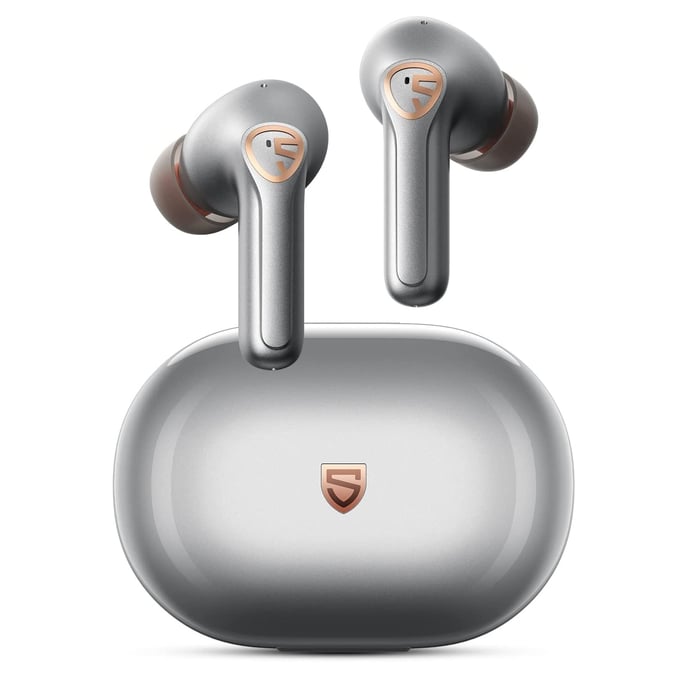
SoundPEATS H2 Hybrid Dual-Driver Wireless Earbuds with aptX Adaptive
129219
Additional options
 Split to 3 interest-free payments
SoundPEATS H2 hybrid-driver wireless earbuds
SoundPEATS H2 uses two driver types in each earbud: a Knowles balanced-armature driver and a dynamic driver, with a crossover dividing the sound ranges between them. The in-ear design suits music, spoken audio and video from compatible devices, while interchangeable silicone tips let you adjust the seal. A stem carries the touch-control area, and the case stores and recharges the earbuds.Specifications for choosing your setup
The individual weight below is for one earbud; the combined weight includes both earbuds and their case. Advertised battery figures are estimates affected by volume, calls, mode, connection conditions and battery age.
SpecificationDetailsDriversKnowles balanced armature + 8 mm dynamicChipset / connectionQualcomm QCC3040 / Bluetooth 5.2CodecsaptX Adaptive, aptX, AAC and SBCMicrophones4 total; cVc 8.0 call processingPlaybackUp to 5 hours per charge; up to 20 with caseDocumented chargingUSB-CSingle-earbud weightApproximately 4.8 gCase with both earbudsApproximately 56.2 gCase dimensions45.8 × 64.7 × 32.6 mmStore SKU6941213629265
Connection, codecs and game mode
The QCC3040 chipset supports Bluetooth audio and aptX Adaptive when the source also supports that codec. Adaptive transmission responds to usage conditions, but a recent Bluetooth version on a phone does not establish codec compatibility. With another source, the connection uses an available codec supported by both devices.
You can use one earbud when appropriate or both for stereo listening. Game mode reduces audio delay, although the phone and application still affect the result. It does not remove every source of latency or guarantee compatibility with every gaming console. Check that your platform can output suitable Bluetooth audio.
Two microphones in each earbud work with cVc 8.0 processing to capture your voice and reduce some noise sent to the person you call. Wind, surrounding activity and microphone position still matter. On a computer, select the earbuds as the input and output inside the calling app and confirm that call audio is enabled.First use and touch commands
Remove the insulating films from the charging contacts and return both earbuds to the case before first use. When the case has power, opening its lid turns the earbuds on for pairing; select SOUNDPEATS H2 in your device’s Bluetooth list. Disconnect an earlier source if it prevents a new connection and follow the model’s pairing instructions.
Double tapping controls playback or answers and ends a call, depending on the current activity. A single left tap lowers volume; a right tap raises it. Triple tapping the left switches game mode, while the right invokes the supported device assistant. Learn the remaining commands from the manual, using dry fingertips and a safe, stationary position.Charging, care and contents
The H2 manual documents USB-C case charging; wireless charging is not promised in this listing. Seat the earbuds so the contacts meet, use a power source that follows the manufacturer’s guidance and avoid fast chargers. Keep the connector and earbuds dry, and gently clean the contact points rather than pressing on charging pins.
The set includes both earbuds, case, USB-C cable, manual and S, M and L silicone tips. Try sizes for a secure, comfortable fit. Listen at moderate volume and remain aware of your surroundings. Keep the earbuds and case dry; do not swim with or immerse them. Recharge periodically during long storage. Gift wrapping is a separate store option. FitNeeds states a one-year manufacturing-defect warranty and certified-seller status.Frequently Asked QuestionsDoes hybrid mean ANC?
No. It describes two driver types. Call-microphone processing is separate from active listening noise cancellation.Can I use H2 with a phone or computer?
Yes, with compatible Bluetooth audio. Check the selected audio device inside your media or meeting app.Will aptX Adaptive work on every phone?
No. The source must support it; the Bluetooth version alone is not enough.Does pairing require a subscription or special app?
The manual uses direct Bluetooth pairing. A music subscription is not required for that step.Can I make calls using one earbud?
Yes. The manufacturer supports either earbud individually; check the selected call-audio route.Will game mode remove delay completely?
No. It reduces delay, while the device, app and connection still contribute to the result.Does the battery run for 20 hours continuously?
That total includes recharging from the case. The earbuds must return to it during extended use.Why might they stay connected with the lid shut?
Check case charge, correct seating and clean contacts before trying a reset.Do S, M and L mean three earbud sets?
No. These are ear-tip sizes. The product contains one pair of earbuds and its listed accessories.How should I store them between uses?
Keep them dry and away from extreme heat, and recharge the set at least every three months during long storage.