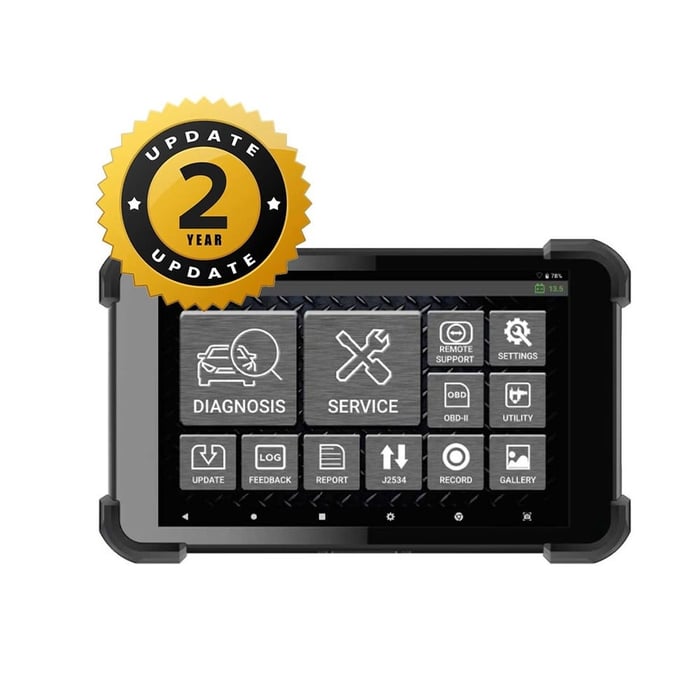
G SCAN 3 -Zenith Z5 Device Diagnostic Scan Tool
6325
 Split to 3 interest-free payments
Specs:
2 Years Update
specs
Condition: New
Manufacturer: Zenith
G-Scan Zenith Z5 Device Specs:
Manufacturer: Zenith
Condition: New
G-Scan Zenith Z5 Device Diagnostic Scan Tool User Manual .pdf
Zenith Z5 Distributor Bulletin 2022 Jan. Update Details G-Scan Zenith Z5 Device Specification Simple, Yet Intuitive Layout:
Zenith Z5 offers a simple iconic main menu for easier and quick access to desired functions. With 3 available display modes, the user can customize the theme and button locations. Service Function
Time is money. Z5 offers shortcuts to the most frequently used functions in the workshops to save time for technicians to navigate through the original menu layout. Auto Selection
Zenith Z5 offers option to automatically detect the vehicle information including the VIN number, model year, model name, engine type, and other necessary information that are retrieved. Quick System Search
‘System Search’ option automatically scans all the vehicle systems, Reports fault codes, and provides access to advanced diagnostic functions in each system detected. Data Log & Feedback System
In a case of communication or function error, a user can log the bi-directional data transmission between the tool and vehicle control systems. This log can be sent to the software development team via the log capture & transfer function. The data log files received will be analyzed, feedback will be passed on, and a patch file update provided, if necessary, often within 24 hours of receiving the report, during working days. (Exceptions may apply) Pre & Post Diagnostic Report
Z5 offers easy creation of diagnostic report with Pre-scan and Post-scan result. Not only you can save the reports as a PDF file in the internal/external memory, with the help of its advanced network connectivity, you can print the report directly with a wireless printer or send them to a desired E-mail address. J2534 Pass-thru
Zenith Z5 acts as a J2534 Pass-thru device for multiple carlines with CAN-Bus, KWP2000, and ISO9141 protocols, supporting J2534 programming and diagnostics. (Exceptions may apply) Fast & Responsive Graphing Mode
Z5 offers a fast and intuitive graphing mode which instantly self-adjusts maximum and minimum scale, enabling the users to observe and compare live data more efficiently. Full Text Description
No more acronyms and cutting of significant texts. Z5 offers the long-text DTC descriptions in full screen, so you get all the information you need. Smart Update
Z5 offers a quick and easy software update process with its strong network connectivity. Previous or latest software versions for each carline can be quickly downloaded directly from the server, as per the user’s preference. Zenith Z5 Supported Vehicles
1. TOYOTA/LEXUS
2. NISSAN/INFINITI
3. HONDA /ACURA
4. MAZDA
5. SUZUKI/MARUTI
6. SUBARU
7. ISUZU
8. FUSO
9. AUDI/VW/SEAT/SKODA
10. FORD EU
11. RENAULT / DACIA
12. BMW
13. LAND ROVER
14. MERCEDES BENZ
15. FIAT / ALFA ROMEO / LANCIA
16. PORSCHE
17. FORD USA
18. CHRYSLER/JEEP/DODGE
19. OPEL / VAUXHALL
20. HOLDEN
21. MERCEDES COMMERCIAL
22. HYUNDAI
23. KIA
24. HYUNDAI/ KIA TRUCK / BUS
25. SMART
26. TATA
27. ETC AC/DC Adapter
Simple, Yet Intuitive Layout:
Zenith Z5 offers a simple iconic main menu for easier and quick access to desired functions. With 3 available display modes, the user can customize the theme and button locations. Service Function
Time is money. Z5 offers shortcuts to the most frequently used functions in the workshops to save time for technicians to navigate through the original menu layout. Auto Selection
Zenith Z5 offers option to automatically detect the vehicle information including the VIN number, model year, model name, engine type, and other necessary information that are retrieved. Quick System Search
‘System Search’ option automatically scans all the vehicle systems, reports fault codes, and provides access to advanced diagnostic functions in each system detected. Data Log & Feedback System
In a case of communication or function error, a user can log the bi-directional data transmission between the tool and vehicle control systems. This log can be sent to the software development team via the log capture & transfer function. The data log files received will be analyzed, feedback will be passed on, and a patch file update provided, if necessary, often within 24 hours of receiving the report, during working days. (Exceptions may apply) Pre & Post Diagnostic Report
Z5 offers easy creation of diagnostic report with Pre-scan and Post-scan result. Not only you can save the reports as a PDF file in the internal/external memory, with the help of its advanced network connectivity, you can print the report directly with a wireless printer or send them to a desired E-mail address. J2534 Pass-thru
Zenith Z5 acts as a J2534 Pass-thru device for multiple carlines with CAN-Bus, KWP2000, and ISO9141 protocols, supporting J2534 programming and diagnostics. (Exceptions may apply) Fast & Responsive Graphing Mode
Z5 offers a fast and intuitive graphing mode which instantly self-adjusts maximum and minimum scale, enabling the users to observe and compare live data more efficiently. Full Text Description
No more acronyms and cutting of significant texts. Z5 offers the long-text DTC descriptions in full screen, so you get all the information you need. Smart Update
Z5 offers a quick and easy software update process with its strong network connectivity. Previous or latest software versions for each carline can be quickly downloaded directly from the server, as per the user’s preference.